
Writing
Update Intel NIC Drivers on ESX 4.1
I Installed an IBM x3650 M3 the other day. During the installation the additional Intel NIC was not recognized by default in the ESX Host.
This I could see in two different ways, from the output on the console
msaidelk@esx9:~$ sudo lspci | grep Ethernet0b:00.0 Ethernet controller: Broadcom Corporation Broadcom NetXtreme II BCM5709 1000Base-T (rev 20)
0b:00.1 Ethernet controller: Broadcom Corporation Broadcom NetXtreme II BCM5709 1000Base-T (rev 20)
10:00.0 Ethernet controller: Broadcom Corporation Broadcom NetXtreme II BCM5709 1000Base-T (rev 20)
10:00.1 Ethernet controller: Broadcom Corporation Broadcom NetXtreme II BCM5709 1000Base-T (rev 20)
15:00.0 Ethernet controller: Intel Corporation Unknown device 1516 (rev 01)
15:00.1 Ethernet controller: Intel Corporation Unknown device 1516 (rev 01)
1f:00.0 Ethernet controller: Intel Corporation Unknown device 1516 (rev 01)
1f:00.1 Ethernet controller: Intel Corporation Unknown device 1516 (rev 01)
And the GUI also only recognized the first 4 Broadcom NICs (instead of 8)
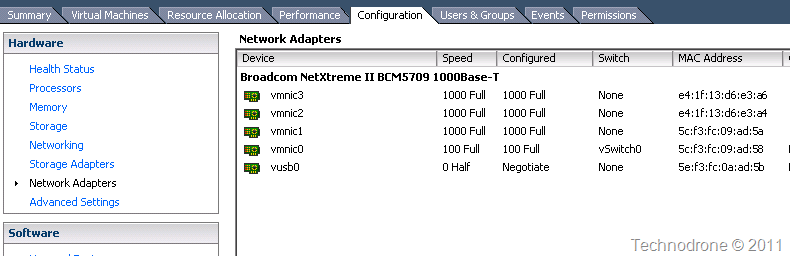
I posted an article about IBM x3650 M3 Does not Recognize NICs a while back - but as you can see from the output above they are recognized in hardware - just ESX does not know how to deal with them.
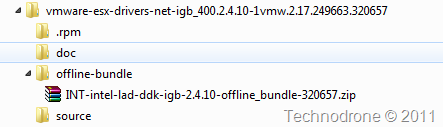
I downloaded the driver from VMware’s Site and extracted the files from the ISO image and the file I am interested in is in the offline-bundle folder
The host has to be in Maintenance mode for the patch update.
Install through vCLI
C:\Program Files (x86)\VMware\VMware vSphere CLI\bin>vihostupdate.pl --server esx9.maishsk.local --username root -i -b [\\vc\VMware\ESX\INT-intel-lad-ddk-igb-2.4.10-offline_bundle-320657.zip](file://\vc\VMware\ESX\INT-intel-lad-ddk-igb-2.4.10-offline_bundle-320657.zip)After installation
msaidelk@esx9:~$ sudo lspci | grep Ethernet0b:00.0 Ethernet controller: Broadcom Corporation Broadcom NetXtreme II BCM5709 1000Base-T (rev 20)
0b:00.1 Ethernet controller: Broadcom Corporation Broadcom NetXtreme II BCM5709 1000Base-T (rev 20)
10:00.0 Ethernet controller: Broadcom Corporation Broadcom NetXtreme II BCM5709 1000Base-T (rev 20)
10:00.1 Ethernet controller: Broadcom Corporation Broadcom NetXtreme II BCM5709 1000Base-T (rev 20)
15:00.0 Ethernet controller: Intel Corporation 82580 Gigabit Network Connection (rev 01)
15:00.1 Ethernet controller: Intel Corporation 82580 Gigabit Network Connection (rev 01)
1f:00.0 Ethernet controller: Intel Corporation 82580 Gigabit Network Connection (rev 01)
1f:00.1 Ethernet controller: Intel Corporation 82580 Gigabit Network Connection (rev 01)
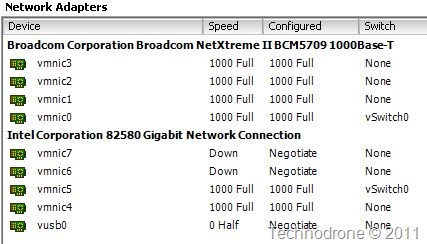
Host rebooted and it comes up with all NICs recognized.
I wanted to try this PowerCLI as well. I ran into some issues that I will address in a different post.